
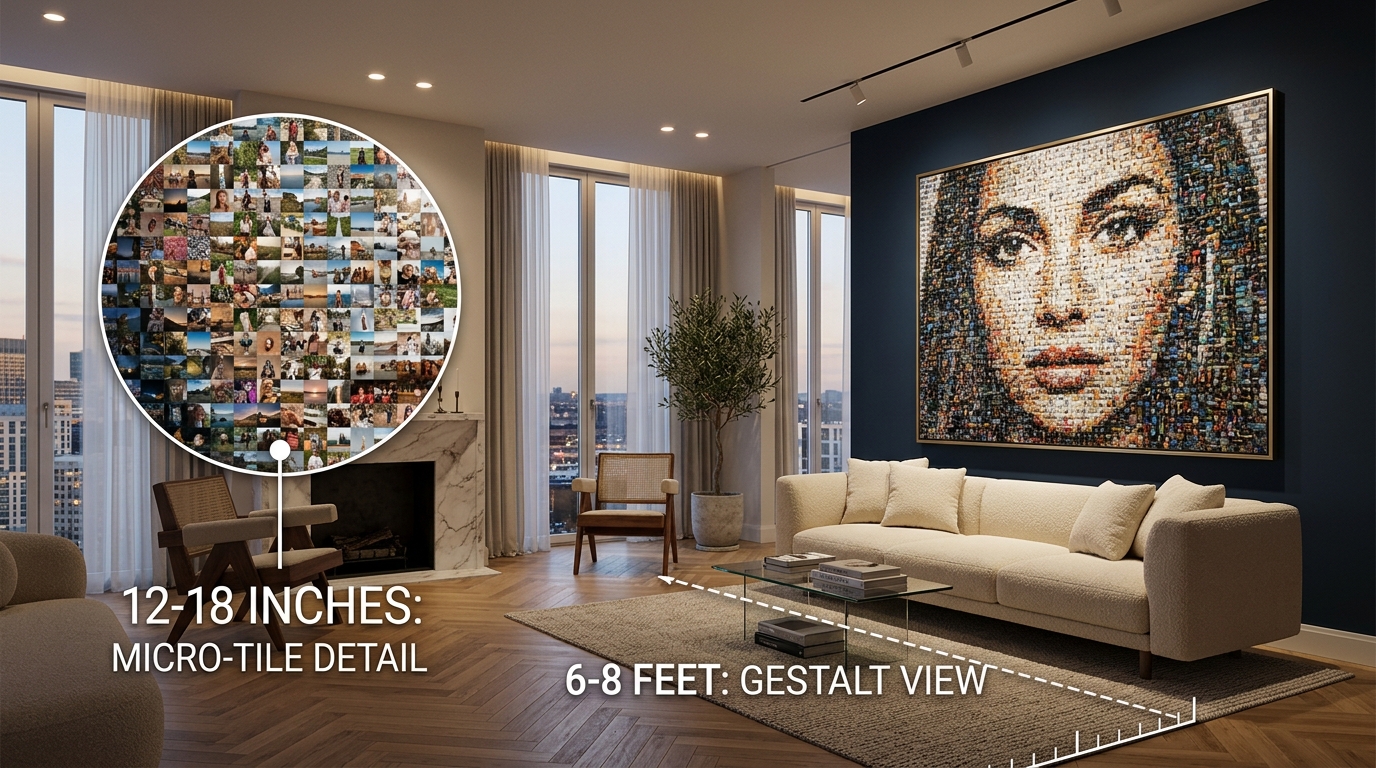
1. The Visual Acuity Formula: How Viewing Distance Dictates Tile Sizing
Unlike standard wall posters or paintings that have a single optimal viewing point, a photo mosaic is an interactive optical paradox. According to Gestalt perceptual psychology, viewing a photo mosaic activates two competing cognitive channels:
- Macro Optical Fusion: The distance at which thousands of varied micro-colors blend into a recognizable human portrait or landscape.
- Micro Storytelling Inspection: The intimate distance at which an observer steps close to locate their own face, an anniversary snapshot, or a childhood memory.
Human 20/20 visual acuity resolves approximately 1 arcminute (1/60th of a degree) of visual angle. To ensure that an individual photo tile can be clearly identified without squinting, the minimum physical dimension of a tile ($T$) based on inspection distance ($D$) is calculated as:
In physical printing terms, this means:
- At 12 to 18 inches (Arm's Length): Individual tiles must measure between 0.75 inches and 1.0 inch. At 300 DPI, each tile contains 225×225 to 300×300 raw pixels, providing complete clarity for facial smiles and architectural textures.
- At 6 to 10 feet (Across the Room): Individual tile boundaries visually dissolve into continuous gradients, allowing the brain's visual cortex to perceive the overarching subject effortlessly.
2. Room-by-Room Customization Matrix
Every living space presents unique depth constraints, ambient lighting conditions, and traffic paths. The following matrix matches physical canvas dimensions to specific architectural settings:
| Room Context & Depth | Recommended Canvas Size | Photo Library Size | Optimal Tile Dimension | Target Resolution (300 DPI) |
|---|---|---|---|---|
| Living Room Accent Wall Viewing Depth: 8 to 14 ft |
24 × 36" to 36 × 48" | 1,200 to 2,500 photos | 0.85" to 1.25" | 7,200 × 10,800 px (77.7 MP) |
| Hallway / Stairwell Gallery Viewing Depth: 2.5 to 5 ft |
18 × 24" (Portrait) | 600 to 1,200 photos | 0.65" to 0.85" | 5,400 × 7,200 px (38.8 MP) |
| Executive Study / Office Viewing Depth: 4 to 8 ft |
20 × 30" | 800 to 1,500 photos | 0.75" to 1.00" | 6,000 × 9,000 px (54.0 MP) |
| Corporate Lobby / Event Hall Viewing Depth: 12 to 25+ ft |
48 × 72" (Multi-Panel) | 3,000 to 6,000+ photos | 1.25" to 1.75" | 14,400 × 21,600 px (311 MP) |
3. The Four Core Customization Controls for Wall Art
When preparing digital artwork for physical gallery presentation, four technical parameters determine whether the print looks like a museum masterpiece or an amateur digital wash:
1. Anti-Clustering Penalty (≥0.35)
In family and wedding portraits, hundreds of photos may share identical beige skin tones or green grass backgrounds. Without an intelligent neighborhood reuse penalty, standard software clusters the same 3 photos across entire cheeks. Setting a reuse penalty of ≥0.35 with a 3-tile radius guarantees diverse distribution.
2. Color Overlay Wash (≤10%)
Legacy cloud generators cover mismatched photos with a 40%–60% translucent color overlay. While this creates a quick thumbnail preview, physical wall prints look murky and washed out. High-end wall art requires CIELAB ΔE optical color matching with 0% to 10% maximum overlay.
3. 1.5-Inch Mirrored Wrap Bleed
Gallery-wrapped canvas wraps around 1.5-inch wooden stretcher bars. If artwork is printed without bleed, perimeter faces and photos are bent around the sides. Photomosaic.work provides automatic 1.5" mirrored perimeter bleed to keep the face of your canvas pristine.
4. Tile Spacing & Grout Lines
Adding a subtle 0.5mm to 1.0mm neutral border (white or charcoal grout) between tiles emphasizes the tactile mosaic craftsmanship, creating a crisp physical mosaic aesthetic reminiscent of classical Roman tesserae.
4. Physical Substrate Selection: Canvas vs Acrylic vs Brushed Metal
Transferring an ultra-high-resolution photomosaic onto physical materials requires selecting the right substrate for your room's ambient lighting:
- Museum Gallery Canvas Wrap (1.5" Stretcher Bars): Matte textured surface completely eliminates glare from spotlights and windows. Warm, classic, and timeless for family heirlooms and wedding tributes.
- Polished Acrylic Glass (Face-Mounted Dibond): Light refracts through a 4mm polished acrylic pane, intensifying micro-contrast and saturating deep shadows. Ideal for modern minimalist interiors and corporate headquarters.
- Brushed Aluminum Dibond: Direct UV cured print on matte silver aluminum. White areas take on a metallic shimmer, offering stunning industrial elegance for architectural and automotive showcases.
5. WebAR Room Scale Visualization: Preview Before Printing
Abstract dimensions like "24×36 inches" can be difficult to visualize on an empty wall. To solve this, Photomosaic.work incorporates browser-native WebAR (Augmented Reality) projection. By scanning an on-screen QR code with your smartphone camera, you can place a 1:1 true-scale 3D canvas directly onto your living room wall in real time—with zero app installations required.
This preview workflow allows you to test whether a 24×36" or 36×48" piece best balances your furniture, evaluates ceiling clearance, and verifies comfortable viewing distance before submitting files for fine art giclée printing.