
The Fundamental Flaw in Legacy Photomosaic Software
When the first digital photomosaic algorithms were popularized in the mid-1990s, computer hardware was severely constrained. To calculate whether an individual tile photo matched a patch of the master portrait, early systems took a mathematical shortcut: they treated 24-bit RGB values as a 3D Euclidean vector space and calculated straight-line distance:
While computationally cheap, this formula produces disastrous optical results. The human eye does not perceive Red, Green, and Blue photons equally. Our retinas possess roughly 64% L-cones (red), 32% M-cones (green), and only 4% S-cones (blue). In Euclidean RGB space, two colors with a calculated distance of 15 units can look identical in green hues yet completely discordant in purple hues.
Because legacy tools could not achieve optical harmony with Euclidean math, they introduced a destructive compromise: the 40% to 60% translucent color overlay. They slapped a semi-transparent colored wash of the master image across every photo. From 10 feet away, the image looked recognizable, but stepping close revealed blurry, tinted squares where memories had been destroyed.
 0% Overlay (Pure CIELAB Match)
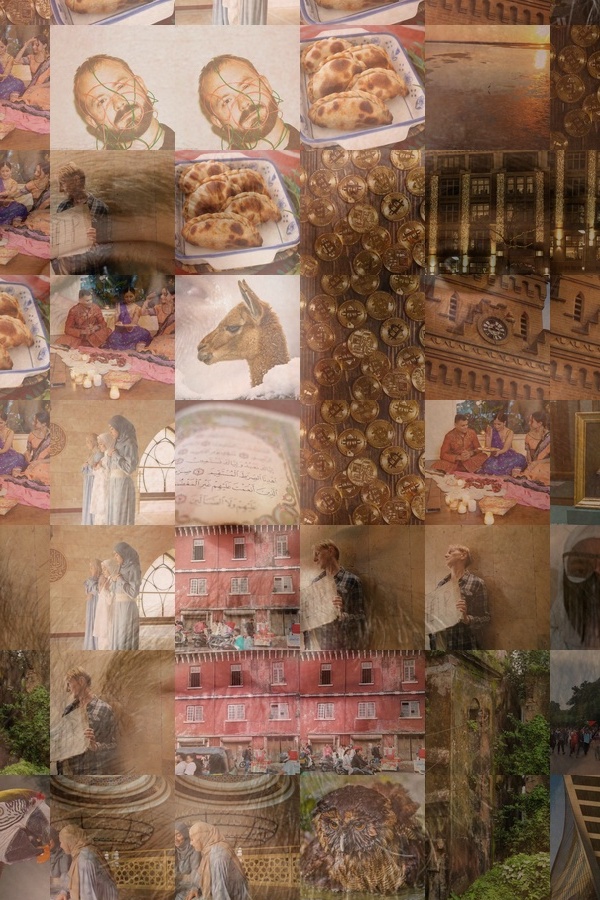 50% Overlay (Legacy Muddy Tint)
The Geometry of Perception: MacAdam Ellipses & CIELAB
In 1942, physicist David MacAdam mapped out the boundaries of chromatic discrimination, discovering that regions of "just-noticeable difference" (JND) form elongated ellipses of varying sizes across the chromaticity plane. A uniform color space was desperately required.
Color Geometry: Non-Linear Perceptual Ellipsoid vs Rigid Cube
Why standard Euclidean 3D Euclidean math distorts skin tones, while CIELAB opponent axes mirror retinal rod & cone processing.
In 1976, the International Commission on Illumination (CIE) established CIELAB ($L^*a^*b^*$). It operates on an opponent color model inspired by human neurological processing:
- $L^*$ (Luminance): Ranges from 0 (pure black) to 100 (diffuse white).
- $a^*$ (Red-Green axis): Negative values indicate green, positive values indicate red/magenta.
- $b^*$ (Blue-Yellow axis): Negative values indicate blue, positive values indicate yellow.
By transforming raw sRGB image buffers into CIELAB coordinates via the CIE XYZ D65 illuminant matrix, color distance maps directly to human retinal perception:
| ΔE Value Range | Human Visual Perception | Photomosaic Impact |
|---|---|---|
| ΔE ≤ 1.0 | Imperceptible to the human eye | Flawless tonal match; 0% overlay needed |
| 1.0 < ΔE ≤ 2.5 | Perceptible only through close inspection | Excellent photographic blend; sharp texture |
| 2.5 < ΔE ≤ 5.0 | Noticeable difference on casual glance | Acceptable in busy high-frequency textures |
| ΔE > 10.0 | Completely mismatched color tones | Requires spatial neighborhood penalty or variety swap |
From CIE76 to CIEDE2000 (ΔE00)
While CIE76 was a monumental improvement over RGB, human vision still exhibits non-uniformity in highly saturated blues and neutral grays. In 2001, the CIE standardized CIEDE2000, introducing weighted correction factors for lightness ($S_L$), chroma ($S_C$), and hue ($S_H$), alongside an interactive rotation term ($R_T$) to resolve blue-violet non-linearities.
In the Aameeq Photomosaic engine, our client-side WebGL2 shaders evaluate tile palettes using an optimized CIELAB metric. By indexing a user's 500 to 2,000 photos into 3D CIELAB k-d trees in under 40 milliseconds, the engine locates the nearest perceptual neighbor for every grid cell instantly.
The 0% Overlay Benchmark: Real Visual Proof
When you eliminate the reliance on fake translucent color tinting, every individual tile photo retains its natural dynamic range, contrast, and memory value. A family member's smiling face or an anniversary candid doesn't get masked by a muddy pink or brown film—it stays 100% photographic.
To experience the difference in real-time, creators can test our Artistic Quadtree Engine or dive into our 300 DPI High-Resolution Guide.