The Science of Photomosaics
Exploring Cinematic Color Profiling™, High-Performance Parallel Rendering, and high-resolution art generation.
How to Create the Perfect Photomosaic
1. Choose a Clear Main Image
Select a photo with high contrast and distinct shapes. Portraits and close-ups work best as the primary subject.
2. Prepare Your Tile Library
The variety of your tiles determines the final quality. We recommend uploading 100-500 photos for optimal color blending.
3. AI-Powered Matching
Our algorithm analyzes every pixel using Proprietary Color Mapping™ to ensure 99% color accuracy.
Technical Excellence & Performance
Perceptual Color Logic
Unlike standard RGB matching, our engine operates using Proprietary Color Mapping™. This mimics human perception, ensuring tiles match the "feel" and "warmth" of the image.
High-Performance Rendering
Powered by Cloud-Parallel Sequencing, our backend processes thousands of tiles in seconds, allowing for near-instant high-res results.
Print-Ready Exports
Generate TIFF and PNG files optimized for large-scale physical printing, billboard murals, and digital galleries.
WebAR (Augmented Reality)
Uses MindAR target tracking compiler. Converts static prints into interactive experiences, overlaying cinematic video on the poster in the user's mobile browser without any app download.
4K Animation Studio
A suite of 12 cinematic animations (including Liquid Wave, Zoom Reveal, Morph, and Fly-In) compiled dynamically using background workers and exported as 4K MP4 or high-fidelity GIFs.
Living Mosaics
Backend parses uploaded video clips, extracts optimal keyframes for grid matching, and enables interactive hover-play video tiles, turning standard mosaics into a mural of motion.
The Science: Perceptual Vision Accuracy
Most generators use Standard RGB distance. However, RGB does not correlate with human vision. A bright green and a bright blue might be mathematically close in RGB but look vastly different to the eye.
Photomosaic uses a Vision Alignment Score based on proprietary Perceptual Color Logic. This system separates luminosity from chromaticity, allowing our AI to match perceived brightness and chromaticity perfectly.
Frequently Asked Questions
What is a photo mosaic and how does it work?
A photo mosaic is an artwork composed of hundreds or thousands of miniature photograph tiles that merge together to reveal a master image. Photomosaic.work analyzes chromatic geometry in CIELAB color space, matching each sector optically with 0% artificial color tinting.
What are the differences between traditional and AI-generated photo mosaics?
Traditional tools force rigid square grids and blend a 40%-60% translucent color wash over photos, causing blurriness. Modern AI mosaics at Photomosaic.work feature adaptive Quadtree multi-scale tiling (micro-tiles on facial details), CIELAB Delta-E perceptual math, anti-repetition distance penalties, and WebAR living poster integration.
How many photos do you need to make a detailed mosaic portrait?
Between 150 and 2,000 photos are supported. The optimal sweet spot for portraiture is 300 to 800 photos with a neighborhood reuse penalty (radius >= 3) to prevent identical photos from clustering across facial contours.
What file size is best for creating large photo mosaics?
For 18x24" or 24x36" gallery prints at 300 DPI, master images should ideally range between 5,400x7,200px and 7,200x10,800px (15MB to 45MB PNG/TIFF). Photomosaic.work processes these native canvas resolutions directly without downscaling.
What should I look for in a photo mosaic maker for wall art? Can photo mosaic artwork be customized for different room sizes?
When selecting a photo mosaic maker for physical wall art, look for three non-negotiable optical standards:
- True Optical Matching (0% Color Overlay Tint): Many budget tools slap a 40%–60% colored wash over photos. Up close, memories look like blurry colored rectangles. A true gallery-grade maker uses CIELAB \(\Delta E\) color science to match photos optically without any artificial tint.
- Adaptive Quadtree Multi-Scale Tiling: Rigid uniform grids break down on fine facial features and architectural silhouettes. Quadtree tiling places large photos in backgrounds/skies and subdivides into micro-tiles across intricate silhouettes.
- Native 300 DPI Physical Canvas Calibration: A digital image designed for a screen will look pixelated on a wall. Your mosaic must output at uncompressed 300 DPI calibrated to physical viewing distances.
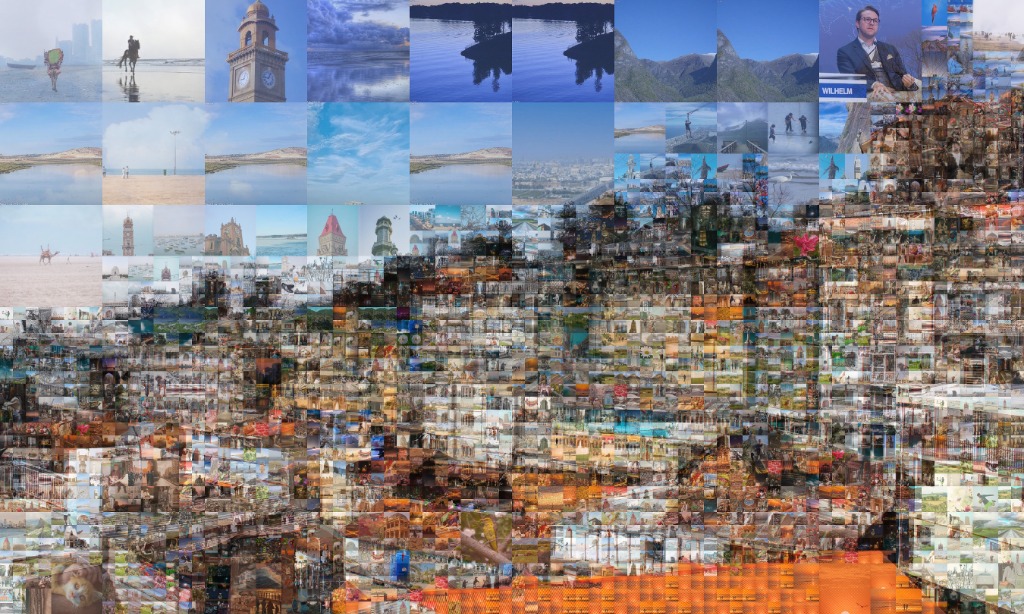
Room Size & Viewing Distance Calibration:
- Compact Spaces (Home Office / Entryway / Hallway): 11x14" or 16x20" at 300 DPI (\(3,300 \times 4,200\text{px}\)). Ideal viewing distance is 2–3 feet with 300–500 tiles (\(\sim 0.6\)–\(0.8\) inches each).
- Medium Living Areas (Living Room / Master Bedroom): 18x24" or 20x30" at 300 DPI (\(5,400 \times 7,200\text{px}\)). Viewing distance is 4–6 feet with 600–1,200 tiles (\(\sim 0.5\)–\(0.7\) inches each).
- Grand Statement Walls (Corporate Atriums / Boardrooms / Feature Walls): 24x36" up to custom 40x60" architectural dimensions (up to \(12,000 \times 9,000\text{px}\)). Perfect dual-perspective: a coherent master portrait from 10 feet away, revealing 1,500+ crisp individual memories at 12 inches.
Are there photo mosaic platforms that support 4K or ultra HD exports?
Yes. Photomosaic.work provides ultra-high-resolution print files up to 12,000x9,000 pixels (exceeding 8K UHD) and 4K cinematic animation video reveals (MP4/GIF across 12 motion archetypes).
Can AI create a photo mosaic automatically from a large photo library?
Yes. Photomosaic.work features native 1-click cloud pickers for Google Photos and Google Drive. The engine scans thousands of photos, analyzes CIELAB histograms, and positions every tile automatically in seconds.
How much does it cost?
Standard high-resolution downloads are $1.00 each. Every new user receives 10 free creation credits with promo code WELCOME10.